Assignment 02: C shell by the shore
Due Tuesday, Feb 3, before midnight
The goals for this assignment are:
-
Working with stdout, stdin, and files
-
Understanding redirection and pipes at the command line
-
Working with system calls: read, write, open
-
C practice
This is the first assignment of your shell project. To get started, click on this Shell Project on Github
1. Microcat
By Dianna Xu
In the file, microcat.c, implement a C program that concatenates and prints files
to standard output. If no arguments are given, it takes input from stdin.
$ ./microcat lyrics.txt
What a beautiful face
I have found in this place
That is circling all round the sun
What a beautiful dream
That could flash on the screen
In a blink of an eye and be gone from me
Soft and sweet
Let me hold it close and keep it here with me
$ cat lyrics.txt | ./microcat
What a beautiful face
I have found in this place
That is circling all round the sun
What a beautiful dream
That could flash on the screen
In a blink of an eye and be gone from me
Soft and sweet
Let me hold it close and keep it here with me
$ ./microcat < lyrics.txt
What a beautiful face
I have found in this place
That is circling all round the sun
What a beautiful dream
That could flash on the screen
In a blink of an eye and be gone from me
Soft and sweet
Let me hold it close and keep it here with me
$ ./microcat
hello
hello
nice hat
nice hat
$ ./microcat B.txt A.txt C.txt D.txt
World
Hello
!!!
All life is precious
Requirements/Hints:
-
Use the low-level system calls for working with files: read, write, open
2. Parser
| This question is from this lab. |
In the file, libparser.c, implement a function that parses command line input.
This function should fill in a struct Cmd that holds the information needed to execute. Your struct should look as follows.
struct Cmd {
  char **cmd1_argv;
  char **cmd2_argv;
  char *cmd1_fds[3];
  char *cmd2_fds[3];
}
Sample output from your program should look as follows:
Plain command: ls -l
cmd1_args: ["ls", "-l", NULL]  /* three-element dynamically-allocated array */
cmd2_args: NULL  /* There is no second command here. */

cmd1_fds[0]: NULL  /* With no I/O redirects, all descriptors are NULL */
cmd1_fds[1]: NULL
cmd1_fds[2]: NULL

cmd2_fds[0]: NULL
cmd2_fds[1]: NULL
cmd2_fds[2]: NULL
Pipe only command: ls | sort
cmd1_args: ["ls", NULL]  /* two-element dynamically-allocated array containing */
cmd2_args: ["sort", NULL]  /* two-element dynamically-allocated array containing */

cmd1_fds[0]: NULL  /* With no I/O redirects, all descriptors are NULL */
cmd1_fds[1]: NULL
cmd1_fds[2]: NULL

cmd2_fds[0]: NULL
cmd2_fds[1]: NULL
cmd2_fds[2]: NULL
Redirects only: ls -l 1> out.txt 2> error.txt
cmd1_args: ["ls", "-l", NULL]  /* three-element dynamically-allocated array */

cmd2_args: NULL  /* There is no second command here. */

cmd1_fds[0]: NULL
cmd1_fds[1]: "out.txt"
cmd1_fds[2]: "error.txt"

cmd2_fds[0]: NULL  /* There is no second command here. */
cmd2_fds[1]: NULL
cmd2_fds[2]: NULL
Combined: grep -i blah < input.txt | sort 1> output.txt
cmd1_args: ["grep", "-i", "blah", NULL]  /* four-element dynamically-allocated array */
cmd2_args: ["sort", NULL]  /* two-element dynamically-allocated array containing */

cmd1_fds[0]: "input.txt"
cmd1_fds[1]: NULL
cmd1_fds[2]: NULL

cmd2_fds[0]: NULL
cmd2_fds[1]: "output.txt"
cmd2_fds[2]: NULL
Requirements/Hints:
-
Use only C commands, such as malloc/free, for this program
-
The comments above are to help you understand what memory you should allocate. Don’t print the information in the comments.
-
Make sure you have no memory errors!
-
You can extend the above struct if you like, but don’t change the given data types!
-
You can assume that you will have at most one pipe
-
Note that the 2> error.txt, |, and & portions of the command are instructions to the shell and are NOT command ARGV tokens.
-
To simplify parsing, you may assume that nothing other than white space (spaces, newlines, etc.) will appear after an ampersand (&), there will be at most one ampersand, and that ampersands will not appear for any reason other than to specify background tasks.
3. Simple Shell
In the file, shell01.c, write a program that implements a simple shell.
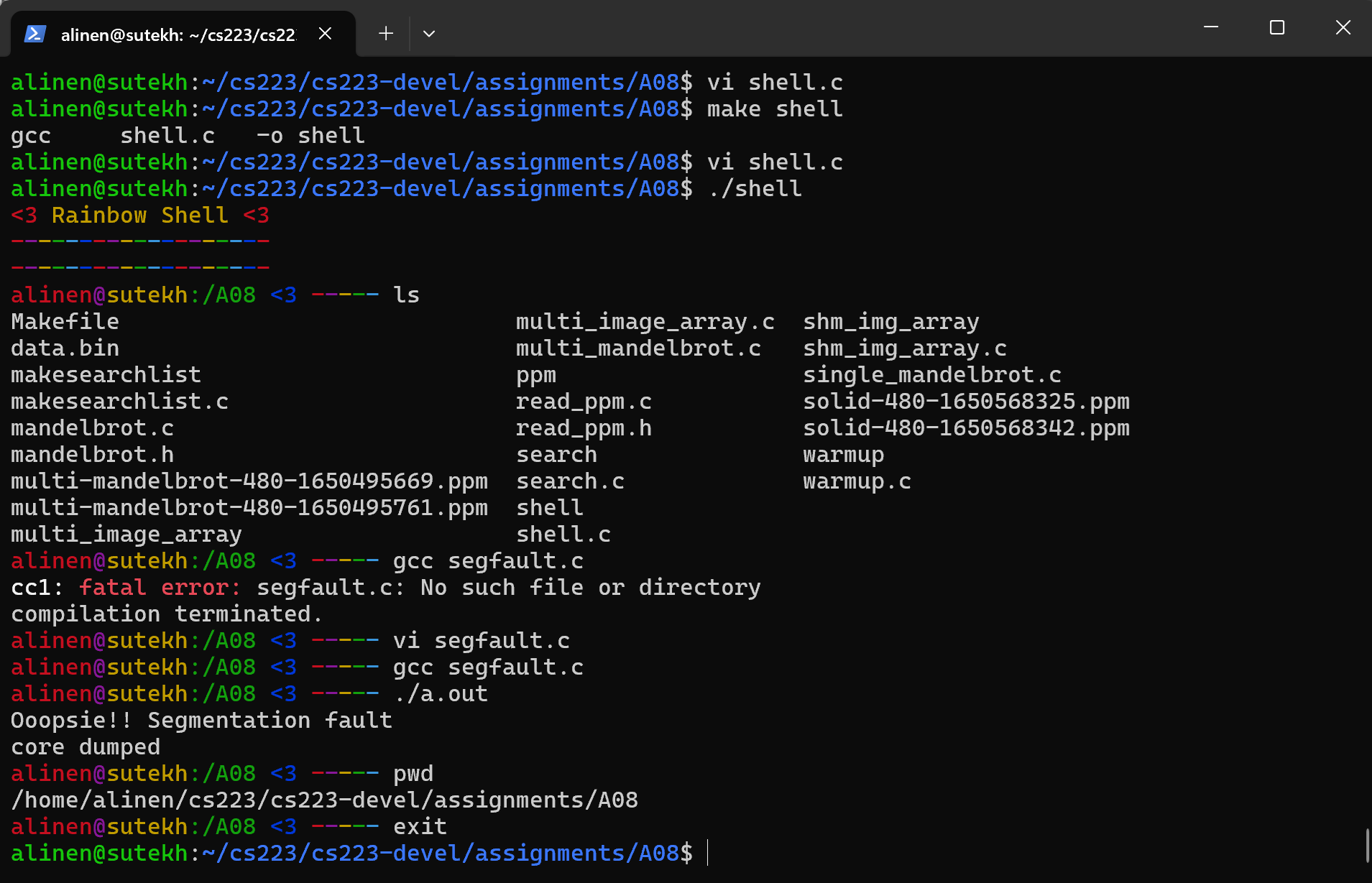
Requirements:
-
Your program should print a prompt. At minimum, your prompt should show the current working directory and look distinct from the lab machine prompts. In other words, it should be easy to tell what shell if running from the terminal.
-
Use the
readline()function to get user input. This function supports backspace, tab completion, and more. Documentation for readline can be found here. -
Use the
add_history()function to save user history. This will allow arrow keys to work. Documentation for readline can be found here. -
Your program should quit if the users types
exit. -
Make sure you don’t crash on an empty command!
-
When the user gives a command, split it into a command using
get_commandfrom the previous question. Then call execvp after creating a new process with fork. -
Compiles with
make. (Do not modify the Makefile) -
No memory errors using
valgrind -
Adheres to the style guidelines
-
Your terminal should wait for the command to finish. If the command terminates with an error, such as a segmentation fault, report the error.
Below is a code example from class that shows how to use exec with fork. You can use this as a starting point. Your book also has code that shows how to write a simple shell.
int main() {
  char* command[3] = {"ls", "-l", NULL};
  pid_t child = fork();
  if (child == 0) {
    if (execvp(command[0], command) == -1) {
      printf("Command not found: \n", command[0]);
      exit(1);
    }
  }
  else {
    int status = 0;
    waitpid(child, &status, 0);

    if (WIFSIGNALED(status)) {
      int signal = WTERMSIG(status);
      printf("Abnormal termination: %s\n", strsignal(signal));
      if (WCOREDUMP(status)) {
        printf("core dumped\n");
      }
    }
  }
}
readline is a package that is installed on goldengate and in our labs. However, you may need to install it on your own machine. On Unix systems, this can be done by running sudo apt install libreadline-dev
|
You can print with colors to the console using ANSI escape sequences (see below).
For example, printf(ANSI_COLOR_GREEN "Green Text" ANSI_COLOR_RESET); will print green text. Here is a good guide!
|
// Helpful macros for working with color
#define ANSI_COLOR_RED     "\x1b[31m"
#define ANSI_COLOR_GREEN   "\x1b[32m"
#define ANSI_COLOR_YELLOW  "\x1b[33m"
#define ANSI_COLOR_BLUE    "\x1b[34m"
#define ANSI_COLOR_MAGENTA "\x1b[35m"
#define ANSI_COLOR_CYAN    "\x1b[36m"
#define ANSI_COLOR_RESET   "\x1b[0m"
Most prompts print helpful information. Above, we use the
system commands gethostname, getcwd, and getpwuid(geteuid()) to get the
machine name, the current working directory, and current user respectively.
|
| To check for valgrind errors, run valgrind with your executable as an argument |
Submit your work to Github
Add and check in your program using git and then push your changes to Github.
Run the following command inside your shell-USERNAME directory.
$ cd shell-USERNAME
$ git add .
$ git commit -m "Descriptive message"
$ git push
Run git status to check the result of the previous git command.
Check the Github website to make sure that your program uploaded correctly.
4. Grading Rubric
Assignment rubrics
Grades are out of 4 points.
-
(1 points) Microcat
-
(1.5 points) Parser
-
(1.5 points) Shell01
Code rubrics
For full credit, your C programs must be feature-complete, robust (e.g. run without memory errors or crashing) and have good style.
-
Some credit lost for missing features or bugs, depending on severity of error
-
-12.5% for style errors. See the class coding style here.
-
-50% for memory errors
-
-100% for failure to checkin work to Github
-
-100% for failure to compile on linux using make